Can I Extend My Laptop Screen?
Feb 24, 2024
By Jime Chen
0 comments
A laptop screen extender is any display accessory that allows you to use multiple screens simultaneously to easily view various tasks. It can be used on any laptop (Windows, Linux, or MacOS) with a compatible USB port, HDMI, or DisplayPort. This means you can more easily complete various tasks, from graphic design, gaming, and regular office work to video editing, presenting, and school assignments.
Laptop screen extenders are an excellent way to enlarge your workspace and increase your overall productivity at an affordable price.
Excited to learn more? Read on!
Does The Screen Extender Work?
A laptop screen extension expands your display on one computer system. This means you can open separate and multiple windows on each screen and move the cursor seamlessly from one to the other.
Many mistake screen mirroring for extending, but they’re not the same. Screen mirroring allows you to display the content on your device (smartphone, tablet, or computer screen) to another screen. It shows every window displayed on another screen in real time. This is also known as screencasting or screen sharing.
In contrast, a screen extender is an excellent way to boost productivity and reduce task-switching. Instead of alternating between windows to work on your project, you can look at both windows simultaneously.
This type of setup significantly reduces the risk of errors and makes all kinds of tasks more efficient and even enjoyable.
Hardware Requirements
Depending on the brand and model of your screen extension, you’ll need to look for the following ports on your laptop for connectivity: S-Video, VGA, and DVI for older devices, and HDMI, DisplayPort, and USB-C for newer ones.
Desktop monitors are traditionally used as screen extenders, but other options are prominently used. TV screens, projectors, and portable monitors like the Duex line are great for office settings.
Depending on the ports your screen extension requires, you will need HDMI, USB-C, or VGA cables.
Software and Compatibility
A screen extension is an excellent way to boost productivity, regardless of your operating system. Most screen extenders are compatible with Windows, macOS, and Linux laptops or desktops. You can also use them for gaming devices like Switch, PlayStation, and Xbox (and its variations).
On Windows and MacOS, you don’t need to install a new application or drive to use a screen extender. These operating systems have built-in programs that allow you to set everything up.
You can also install specialized dual monitor tools for rich features and a more personalized approach. Apps like Dual Monitor Tools, NVIDIA nView, and DisplayFusion Free are viable options.
Connecting to a second monitor is not difficult and shouldn’t cause any issues. However, you may run into a few basic problems:
- Your computer or device can't support the display (color depth, pixel count, or interface options)
- Your monitor's cable or laptop’s port is damaged or malfunctioning
- Your computer's display drivers don’t have the bandwidth to compute the secondary display correctly
How To Extend Screen on Windows 11/10?
Laptop screen extenders are an excellent way to increase productivity, reduce turnaround time, and avoid errors. It can be used in office settings, classrooms, and homes. It can be used for better viewing, gaming, presentations, designing, and more.
If you use Windows 11 and wish to extend your laptop screen, simply follow these steps to connect to your new display:

Step 1: Connecting the External Display
- Identify Your Laptop’s Display Ports: First, make sure you have the appropriate connectors. Your screen extender may require VGA, DVI, HDMI, DisplayPort, or USB-C cables.
- Connect Your External Monitor: Connect your monitor to your laptop. You may need an adapter to make the most out of your monitor’s specs.
- Power On Your Monitor: Ensure the monitor is plugged into a power source and turned on. The Duex Float has two USB-C ports with pass-through charging for ease of use.
Step 2: Configuring the Extended Screen

- Access Display Settings:Press the Windows key + P to select a display option. You can also access your display settings by clicking Start > Settings > System > Display.
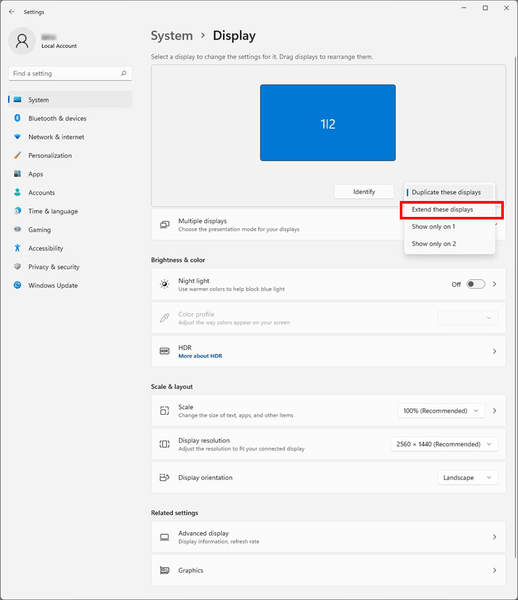
- Detect Your Monitor: The system will detect the extension and show your desktop. Go to Multiple Displays > Extend These Displays if this doesn't happen automatically.
- Extend Your Display:Scroll down to Multiple Displays, select the device from the dropdown menu, and click Apply.
Step 3: Arranging Display Order
- Identify and Rearrange Displays: You’ll need to adjust or drag and drop the numbered displays to match your monitor.
- Set Primary and Secondary Displays:Setting a primary screen is also essential. To do so, click on the display you want as primary (your laptop or extended monitor) and check the box “Make this my main display.”
How To Extend Screen on Mac?
If you want to know how to extend the screen on Mac, follow these steps:
Step 1: Connecting the External Display
- Find Your MacBook’s Ports: Check how many displays your Mac can support. Most monitors require a Thunderbolt (2 or 3), HDMI, USB-C, USB4, or Mini DisplayPort.
- Connect Your External Monitor:Connect your monitor with a compatible cable or adapter. You can connect two or more external screens depending on the available ports and cables.
- Turn On the Monitor: Ensure your external monitor is connected to a power source.
Step 2: Configuring the Extended Screen
- Open Display Preferences:Once your monitor is connected to your laptop and is turned on, you can adjust the display settings, including resolution, brightness, and color profile. Click the Apple menu > System Settings > Displays.

- Arrange Your Displays:You can also customize your extended display according to your needs. To do so, click Displays > Arrangement. If you do not see this option, click Detect Displays.
- Extend Your Desktop: Once the display extension is connected, you can decide whether to extend or mirror your screen. Uncheck the “Mirror Displays” box to extend the desktop across both screens.
Step 3: Arranging Display Order
- Rearrange Monitors: Drag the white menu bars in the Arrangement pane and choose the monitor you want as your primary display.
- Positioning the Displays:You can click and drag the display icons across the screen to match the physical setup of your screens.
Conclusion
Secondary screens have proven to improve productivity and efficiency. It can be used at home, in offices, and even in classrooms for various activities like graphic design, writing, gaming, and more.

If you want to extend your laptop screen, look no further than Duex Float. Its sleek and stacked design maximizes convenience, while its 15.6-inch touchscreen display is a flexible workspace. It can be used as a stand-alone monitor, a dual screen, or for presentations, making it ideal for professionals, students, and gamers alike.
Share
Discover Tech Gadgets
 Mobile PixelsGeminos
From $638.99 USD
$1,000.00 USD
 Mobile PixelsTRIO 3 PRO
$433.49 USD
$599.99 USD
 Mobile PixelsDuex DS Series
From $195.49 USD
$259.99 USD
Reading next

FreeSync vs G-Sync: Best for Gaming?
Feb 21, 2024 Jime Chen 0 comments Feb 28, 2024
Jime Chen
0 comments
Leave a comment
All comments are moderated before being published.
This site is protected by hCaptcha and the hCaptcha Privacy Policy and Terms of Service apply.