





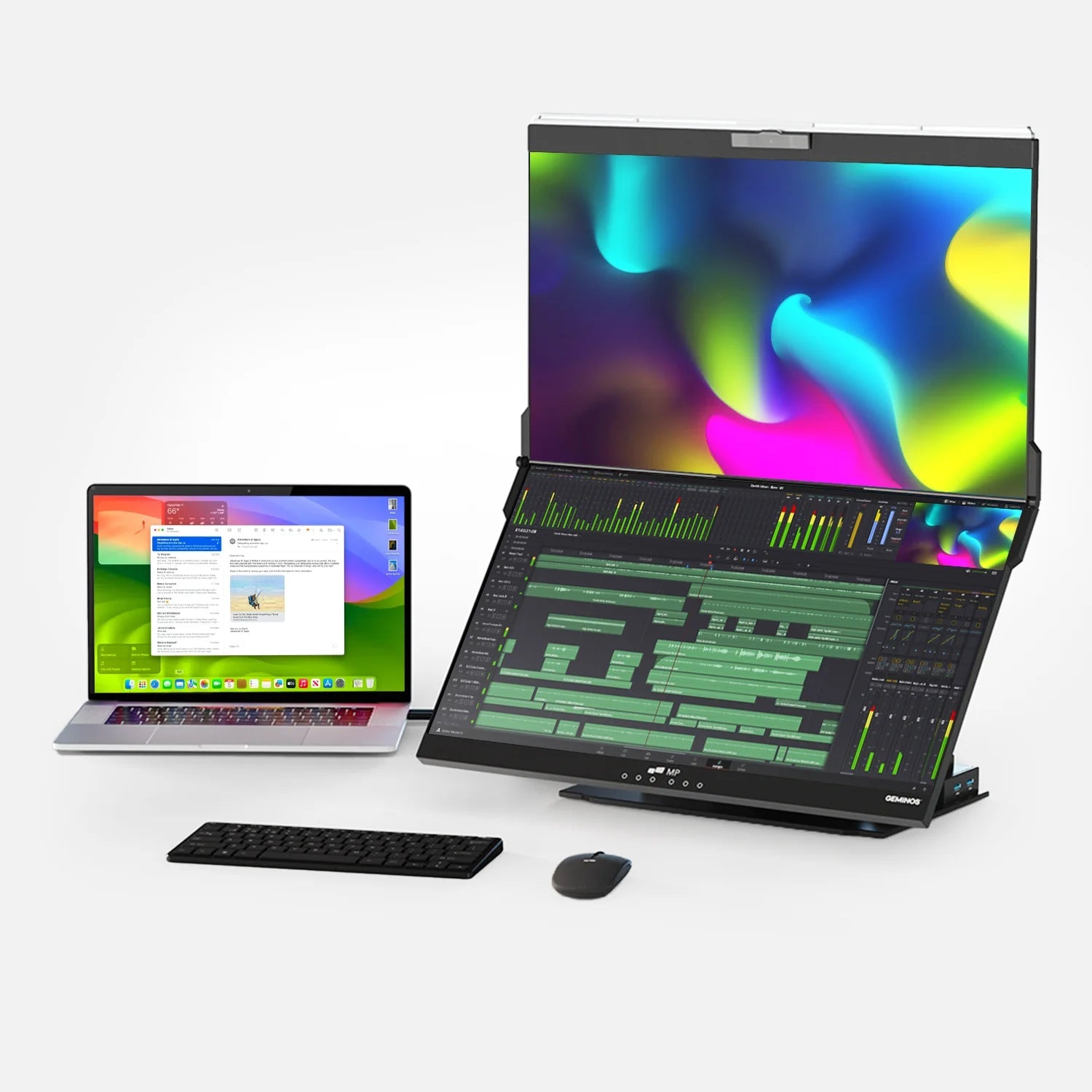
Quick answer: The best portable monitor to buy this Black Friday is the Mobile Pixels Duex Float 2 Pro. It pairs a sharp 16-inch 2.5K (2560 × 1600) screen with a 120Hz refresh rate, built-in speakers and a unique stacked design that puts your second screen directly above your laptop. Mobile Pixels is running Black Friday savings of up to 60% off, which makes it the strongest value in the premium tier this year.
Black Friday 2026 falls on Friday, November 27, with Cyber Monday on November 30. If last year is any guide, electronics will be the most heavily discounted category. According to Adobe Analytics, electronics discounts peaked at 31% off list price during Cyber Monday 2025, and U.S. shoppers spent a record $11.8 billion online on Black Friday 2025, up from $10.8 billion the year before.
This guide compares six of the most reputable portable monitors on the market, explains the specs that actually matter, and shows you how to spot a genuine deal. Every data point links to its source so you can verify it yourself.
Our top picks at a glance
The Duex Float 2 Pro leads because it is the only pick that combines a 2.5K resolution, a 120Hz refresh rate, built-in speakers and a stacked layout at a sub-$300 sale price. Prices below are list or typical street prices as of October 29, 2026; Black Friday prices will vary by retailer.
| Award | Monitor | Screen and resolution | Refresh rate | Brightness | Weight | Typical price |
|---|---|---|---|---|---|---|
| Best Overall | Mobile Pixels Duex Float 2 Pro | 16" IPS, 2560 × 1600 | 120Hz | 350 nits | 2.9 lb | $389.99 list; $263.49 current sale; up to 60% off for Black Friday |
| Best for Brightness | ASUS ZenScreen MB16QHG | 16" IPS, 2560 × 1600 | 120Hz | 500 nits (rated) | 2.64 lb | $399 launch |
| Best Dual-Screen OLED | ASUS ZenScreen Duo OLED MQ149CD | 2 × 14" OLED, 1920 × 1200 each | 60Hz | 400 nits typical | 2.36 lb | $600 MSRP, often about $500 |
| Best for Mac and Touch | Espresso Displays 15 Pro | 15.6" IPS touch, 3840 × 2160 | 60Hz | 550 nits | 1.76 lb (800 g) | $699 with Stand+ |
| Best Lightweight 16-inch | LG gram +view 16MR70 | 16" IPS, 2560 × 1600 | 60Hz | 350 nits | 1.47 lb | $449.99 list |
| Best Compact for Business | Lenovo ThinkVision M14d | 14" IPS, 2240 × 1400 | 60Hz | 300 nits | 1.3 lb | About $260 to $300 |
Weights are for the display alone where the source lists it; stands and covers add weight.
Why a portable monitor is worth it in 2026
Every major study of dual-screen work has found a measurable gain, with reported improvements between 18% and 44%. A portable monitor brings that advantage to wherever your laptop goes.
| Study | What was measured | Reported gain |
|---|---|---|
| University of Utah, 2003 | Text tasks | 44% |
| Jon Peddie Research, 2017 | Expected gain, 1,000+ users | 42% |
| University of Utah, 2003 | Spreadsheet tasks | 29% |
| Jon Peddie Research, 2002 | Reported range | 20% to 30% |
| Wichita State, 2011 | Faster task completion | 18% |
Sources: University of Utah and Wichita State via the Dell white paper and Laptop Mag; Jon Peddie Research via Laptop Mag. The Wichita figure measures task speed.
The University of Utah measured the largest jump on text work. In the Wichita State study, participants finished tasks 18% faster, switched windows 15% less often, and 91% rated dual monitors as more useful than one screen. Most of this research was sponsored by display makers, so treat the exact figures as directional; what matters is the consistency of the results across studies.
Graphics industry analyst Dr. Jon Peddie sums up the principle as "See more, do more," according to Digital Engineering.
Demand is following the research. Market Glass (formerly Global Industry Analysts) estimates the global portable monitor market at $262.9 million in 2024 and projects it will reach $899.2 million by 2030, a 22.8% compound annual growth rate. Estimates vary widely between research firms depending on how they define the category, but all point to strong growth.
How we chose these monitors
We ranked each monitor on seven criteria that matter most to people who work away from a desk, and we checked every spec against the manufacturer page or an independent lab review.
- Sharpness: Resolution relative to screen size. A 2560 × 1600 panel on 16 inches shows noticeably crisper text than 1080p.
- Smoothness: Refresh rate. 120Hz makes scrolling and cursor movement feel fluid; 60Hz is standard.
- Visibility: Rated and, where available, measured brightness in nits.
- Portability: Weight, thickness and whether a stand or cover is built in.
- Connectivity: Single-cable USB-C (DisplayPort Alt Mode) support, HDMI for older laptops, and pass-through charging.
- Ergonomics and setup: Screen position relative to your eye line, and how fast you can go from bag to working.
- Value: Features per dollar at expected Black Friday pricing.
We weighted independent testing heavily. Measured results come from Tom's Hardware, PetaPixel and MonitorNerds. Customer sentiment comes from verified buyer reviews on retailer and brand sites.
Disclosure: This guide is published by Mobile Pixels, the maker of the Duex Float 2 Pro. We have been building portable monitors since 2018 and have tested our own products extensively. To keep the comparison fair, every competitor spec and verdict below links to an independent source, and we note where rivals beat our product.
The best portable monitors for Black Friday 2026, reviewed
1. Mobile Pixels Duex Float 2 Pro: Best Overall

Who it's for: Remote workers, travelers and anyone with a 15- to 16-inch laptop who wants a true dual-screen setup without neck strain.
The Duex Float 2 Pro takes a different approach from every other monitor on this list. Instead of sitting beside your laptop, it stacks above it, so your second screen lines up with your natural eye line. You glance up rather than turning your head sideways all day.
Key specs (from Mobile Pixels):
- 16-inch 2.5K display, 2560 × 1600 pixels, 16:10 aspect ratio
- 120Hz refresh rate with 8ms response time
- 350 nits brightness, 1200:1 contrast, 100% sRGB and 72% NTSC color
- Anti-glare screen and built-in stereo speakers
- Two USB-C ports with 65W pass-through charging, plus mini HDMI
- 2.9 lb and 0.7 in thin: 33% lighter and 20% thinner than the original Duex Float
- Three modes: stacked, presentation (flip the screen to face a client) and free-standing on the built-in kickstand
- Works with macOS and Windows laptops, iPhone 15 and newer, and Samsung DeX phones
Why it wins: No other pick pairs 2.5K sharpness with a 120Hz panel and built-in speakers at this price. Its 16:10 resolution matches most current 16-inch laptops pixel for pixel, so windows look the same size on both screens. Setup takes one USB-C cable for video and power, and the included magnets hold it firmly to your laptop lid.
What owners say: The product holds a 4.97 out of 5 rating from 144 verified reviews on the Mobile Pixels product page. One reviewer summed up the ergonomic payoff: it is "easier to just glance up versus looking sideways."
Trade-offs: At 2.9 lb it is heavier than the LG and Lenovo picks, and 350 nits is bright enough for offices and cafés but not the brightest here. It is designed for 15- to 16-inch laptops; owners of 13-inch machines may prefer the Duex DS Series.
Black Friday deal: Up to 60% off. The current sale price is $263.49 (regular $389.99), which already works out to about $0.72 a day over one year. Every order includes free US shipping, a 2-year warranty and 30-day returns.
Shop the Duex Float 2 Pro Black Friday deal
2. ASUS ZenScreen MB16QHG: Best for Brightness
Who it's for: Photographers and creators who need high brightness and wide color in the field.
The ZenScreen MB16QHG shares the Duex Float 2 Pro's 16-inch, 2560 × 1600, 120Hz recipe in a side-by-side form factor. Tom's Hardware said it splits the difference between 1080p and 4K portable monitors. In its lab, the monitor reached 417 nits, the brightest result in that test, though short of the 500 nits ASUS claims. It also covered 116.3% of DCI-P3.
Trade-offs: Running on a single USB-C cable caps brightness at 60%, so you need the wall adapter for full output. It has no speakers, no Adaptive-Sync and launched at $399.
3. ASUS ZenScreen Duo OLED MQ149CD: Best Dual-Screen OLED
Who it's for: Power users who want two extra screens and deep OLED blacks.
This book-style monitor joins two 14-inch 1920 × 1200 OLED panels on 360-degree hinges, giving roughly a 20-inch diagonal when open. Tom's Hardware called it "one of the best dual-screen monitors I've tested to date" and praised its aluminum build and color.
Trade-offs: The glossy screens attract reflections, there are no speakers, and the $600 MSRP (often about $500 on sale) is steep. Measured brightness came in around 330 to 351 nits in SDR, below the 400-nit rating.
4. Espresso Displays 15 Pro: Best for Mac Users and Touch
Who it's for: MacBook owners and creatives who want a 4K touchscreen.
The Espresso 15 Pro packs a 15.6-inch 4K touchscreen into a 9mm aluminum body. It reaches 550 nits over a single USB-C cable, and the included Stand+ can lift the screen up to 362mm, high enough to sit above a laptop. PetaPixel measured 97.5% sRGB coverage with an average Delta E of 3.47.
Trade-offs: At $699 it costs well over double the Duex Float 2 Pro's sale price. PetaPixel also found it drained a MacBook Pro battery within a few hours, and refresh rate tops out at 60Hz.
5. LG gram +view 16MR70: Best Lightweight 16-inch
Who it's for: Frequent flyers who prioritize weight above all.
At just 1.47 lb (670g) for the panel, the LG gram +view is the lightest 16-inch screen here. It offers 2560 × 1600 resolution, 350 nits, 99% DCI-P3 color, two USB-C ports and auto-rotate through the LG Switch app.
Trade-offs: It runs at 60Hz, relies on a folio cover rather than a sturdy stand, has no speakers, and carries a 1-year warranty at a $449.99 list price.
6. Lenovo ThinkVision M14d: Best Compact for Business
Who it's for: Corporate travelers with 13- to 14-inch laptops.
The ThinkVision M14d is a 14-inch, 2240 × 1400 panel that weighs only 1.3 lb. MonitorNerds measured 97% sRGB coverage and an average Delta E of 1.71, meaning colors are accurate out of the box. Its built-in tilt stand is sturdier than folding covers.
Trade-offs: Brightness is a modest 300 nits, it has only USB-C ports (no HDMI), no speakers, and a 60Hz panel. Street prices run about $260 to $300.
Buying guide: the specs that actually matter
Most buyers should prioritize four things: a resolution that matches their laptop, single-cable USB-C, a comfortable screen position, and enough brightness for where they work.
Resolution and aspect ratio
Resolution is the number of pixels on screen. More pixels on the same size panel means sharper text and more room for windows. A 16:10 aspect ratio (for example, 2560 × 1600) is slightly taller than 16:9, so you see more lines of a document or spreadsheet. Researchers at Pepperdine University found screen resolution was a stronger predictor of productivity and satisfaction than a faster CPU, according to Digital Engineering.
Tip: Match your laptop. If your laptop is 16 inches at 2560 × 1600, a 2.5K 16-inch monitor like the Duex Float 2 Pro keeps windows the same size when you drag them between screens.
Refresh rate (Hz)
Refresh rate is how many times per second the screen redraws. Most portable monitors run at 60Hz. A 120Hz panel makes scrolling and cursor movement look noticeably smoother; Tom's Hardware noted that text stayed crisp while fast-scrolling at 120Hz instead of blurring as it does at 60Hz.
Brightness (nits)
Brightness is measured in nits (candelas per square meter). Around 300 nits suits most indoor rooms. 350 to 400 nits handles bright offices and cafés. Choose 500 nits or more for sunlit spaces. Check fine print: some monitors only reach full brightness with a wall adapter. Tom's Hardware found the ASUS MB16QHG capped at 60% brightness on USB-C power alone.
Color gamut
Color gamut describes how much of a standard color range a screen can show. sRGB is the standard for web and office work; 100% sRGB is ideal for most people. DCI-P3 and Adobe RGB are wider ranges that matter to photo and video editors.
Connectivity: USB-C with DisplayPort Alt Mode
The easiest setup is one USB-C cable that carries video and power. This relies on DisplayPort Alternate Mode, a VESA standard that sends a full DisplayPort signal over USB-C. Not every USB-C port supports it, so check your laptop specs. An HDMI port (included on the Duex Float 2 Pro, ASUS MB16QHG and ASUS Duo OLED) is a useful backup. Pass-through charging lets you plug your charger into the monitor and power both devices; the Duex Float 2 Pro supports up to 65W.
Ergonomics and screen position
Where the screen sits matters as much as what it shows. The OSHA computer workstation guidelines advise placing a monitor directly in front of you, with the top line of the screen at or below eye level. Side-by-side portable monitors push one screen off to the side, so you turn your head repeatedly. A stacked design like the Duex Float 2 Pro keeps both screens on your center line.
"A byproduct of that is more comfort, a better workload and a higher level of satisfaction." Phyllis King, associate director of the Center for Ergonomics at the University of Wisconsin-Milwaukee, on dual-monitor setups, as quoted by Laptop Mag
Panel type: IPS vs. OLED
IPS panels are bright, affordable and resist burn-in. OLED panels deliver true blacks and vivid color but usually cost more and often have glossy, reflective screens. For mixed office work and travel, a quality IPS panel is the practical choice.
How to get the best Black Friday deal on a portable monitor
The deepest electronics discounts arrive over the Thanksgiving to Cyber Monday stretch, so set alerts now and be ready to buy between November 26 and November 30, 2026.
Last year's data shows why timing matters. Adobe Analytics reported that electronics discounts peaked at 31% off list price on Cyber Monday 2025, while Chain Store Age noted electronics discounts had only reached 12% in the first 23 days of November. Over the full 2025 season, U.S. shoppers spent $59.8 billion online on electronics, up 8.2% year over year.
- Track the real price history. Compare the Black Friday price with the price from the past 60 to 90 days, not just the "list" price.
- Buy direct for bundles and warranty. Brand stores often add extras. Mobile Pixels currently includes a free USB-C to HDMI adapter ($29.99 value) with the Duex Float 2 Pro and offers a Productivity Bundle, plus a 2-year warranty.
- Confirm your laptop's USB-C port supports video. Look for DisplayPort Alt Mode or Thunderbolt in your laptop specs before checkout.
- Check the return window. Holiday purchases may need extended returns. Look for at least 30 days.
- Look for extra discounts. Students may qualify for additional savings through the Mobile Pixels student discount program.
- Don't wait for the last hour. Popular models can sell out, and TechCrunch reported shoppers spent $12.5 million per minute at the 2025 Black Friday peak.
Frequently asked questions
What is the best portable monitor to buy on Black Friday 2026?
The Mobile Pixels Duex Float 2 Pro is our Best Overall pick. It combines a 16-inch 2560 × 1600 display, a 120Hz refresh rate, built-in speakers and a stacked, ergonomic design, and it is available at up to 60% off for Black Friday.
When is Black Friday 2026?
Black Friday 2026 is Friday, November 27. Cyber Monday follows on November 30. Many retailers start deals earlier in November.
Are portable monitors worth it?
For most laptop users, yes. A University of Utah study found productivity rose 44% for text tasks and 29% for spreadsheet tasks when people moved from one screen to two. Jon Peddie Research reported an average expected productivity gain of 42% among multi-monitor users.
Do portable monitors need a separate power supply?
Usually not. If your laptop's USB-C port supports DisplayPort Alt Mode, one cable carries both video and power. Some monitors reach full brightness only with a wall adapter, so check reviews before you buy.
Will a portable monitor work with a MacBook?
Yes, as long as your Mac supports an additional external display over USB-C or Thunderbolt. The Duex Float 2 Pro is plug-and-play on macOS and Windows with no drivers required.
What size portable monitor should I buy?
Match your laptop. Choose a 15- to 16-inch monitor for 15- to 16-inch laptops, and a 13- to 14-inch monitor for smaller machines, so that text and windows look consistent across both screens.
Is a 120Hz portable monitor worth it?
If you scroll long documents, edit timelines or play games, yes. 120Hz doubles the redraw rate of standard 60Hz panels, so motion looks smoother and text stays readable while scrolling.
Is a stacked or side-by-side portable monitor better?
A stacked monitor keeps both screens on your center line, which aligns with OSHA guidance to place a monitor directly in front of you. It also takes up less desk space in cafés, planes and hotel rooms. Side-by-side models work well on wide desks.
Can I use a portable monitor with my phone?
Many models support it. The Duex Float 2 Pro works with iPhone 15 and newer and with Samsung DeX-compatible Android phones over USB-C.
Discover Tech Gadgets





Leave a comment
All comments are moderated before being published.
This site is protected by hCaptcha and the hCaptcha Privacy Policy and Terms of Service apply.