






The portable monitor market is booming. According to Precedence Research, the global portable monitor market is projected to grow from $327 million in 2025 to over $2.6 billion by 2035 — a compound annual growth rate of more than 23%. That growth reflects a real shift in how people work: hybrid schedules, digital nomad lifestyles, and the demand for a second screen anywhere have turned the portable monitor from a niche accessory into a mainstream productivity tool.
But a fast-growing market also means a crowded one, full of products with impressive-sounding specs and marketing claims that do not always hold up in real use. This guide cuts through that noise. It explains the criteria that genuinely separate a good portable monitor from a mediocre one, compares the major categories by use case, and gives you a specific recommendation for each.

Quick Answer
The best portable monitor depends on how you use it. For laptop-attached portability, the Mobile Pixels Duex Float 2 Pro is the top pick: it slides out from behind your laptop lid, connects via a single USB-C cable, and requires no stand, power adapter, or bag space. For users who want a standalone 4K display with premium build quality, expect to spend $500 or more. For budget-conscious students and remote workers, quality options exist from $130 to $250 at 1080p or 1440p. The right choice comes down to five criteria: display quality, connectivity, portability format, setup speed, and your most common work location.
Why Portable Monitors Matter More Than Ever
Remote and hybrid work has fundamentally reshaped what a productive workspace looks like. According to Consegic Business Intelligence, approximately 22.8% of U.S. employees worked remotely as of March 2025 — more than 36 million individuals. For millions of those workers, a laptop screen alone is not enough to sustain the kind of focused, multi-application workflow that a desk job historically supported.
|
23.4% Projected CAGR of the global portable monitor market, 2026 to 2035 Source: Precedence Research |
$2.6B Projected global portable monitor market value by 2035 Source: Precedence Research |
|
42% Average productivity increase reported by users of multi-monitor setups Source: Jon Peddie Research |
30% Of portable monitors sold globally are targeted at gaming (120Hz+) Source: Persistence Market Research |
"Growth is driven by the rapid adoption of remote and hybrid work models, increasing demand for dual-screen productivity, rising gaming and content creation activities, and continuous advancements in display technologies such as OLED, high refresh rates, and wireless connectivity."
Future Market Insights, Portable Monitor Market Report 2025
The Five Criteria That Separate Good Portable Monitors from Bad Ones
Before looking at specific products, understand what to evaluate. Spec sheets can be misleading. These are the five criteria that experienced users and independent reviewers consistently cite as decisive.
Criterion 01
Display Quality: Resolution, Panel Type, and Brightness
Resolution determines how sharp text and images appear. For productivity use, 1080p (1920x1080) is the minimum worth considering on screens up to 15.6 inches. At 17 inches or above, 1440p (2560x1440) noticeably improves clarity. For photo or video editing, 4K panels justify their higher cost and power draw.
Panel type matters more than many buyers realize. IPS panels deliver accurate colors and wide viewing angles — the right choice for most productivity and creative use. VA panels offer deeper contrast. TN panels have faster response times but significantly worse color accuracy. OLED panels are entering the portable monitor category and offer exceptional contrast and color vibrancy, though at a higher price and with burn-in considerations for static content.
Brightness is particularly important for portable use, where you cannot control ambient lighting. Look for at least 300 nits for indoor use and 400 nits or more if you plan to use the monitor near windows or outdoors. Anything below 250 nits will struggle in anything other than a dim environment.
Criterion 02
Connectivity: USB-C, HDMI, and Power Delivery
The best portable monitors connect via a single USB-C cable that carries both video and power simultaneously. This eliminates the need for a separate power adapter and simplifies the whole setup to one cable. Confirm the monitor supports USB-C with DisplayPort Alt Mode and that your laptop's USB-C port also carries video output.
An HDMI input provides broader compatibility — important if you plan to connect gaming consoles, older laptops, or devices without USB-C video output. Monitors with both USB-C and HDMI cover the widest range of devices. Power Delivery (PD) passthrough, which allows the monitor to charge your laptop while connected, is a bonus worth checking for if your laptop charges via USB-C.
Criterion 03
Portability Format: Standalone vs. Laptop-Attached
This is the most important structural decision and it is not about specs — it is about how you actually work. There are two fundamentally different formats:
- Standalone portable monitors sit beside or behind your laptop on a flat surface, supported by a kickstand or fold-out cover. They require desk space and need to be set up each time. They are appropriate for hotel desks, coworking spaces, and home offices. Typical weight: 0.5 to 1.2 kg.
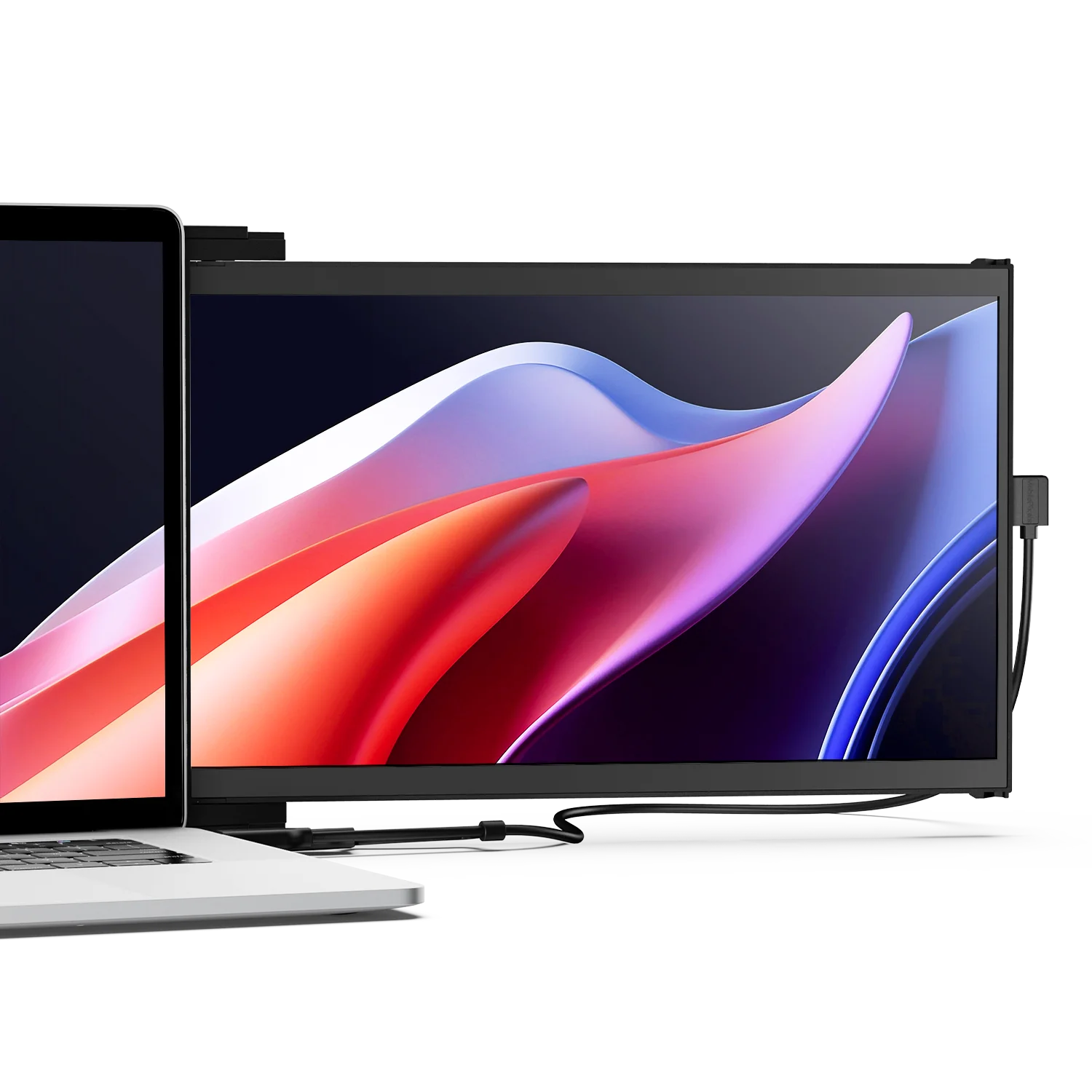
- Laptop-attached monitors use a magnetic or slide-out mount to connect directly to the back of your laptop lid. They travel as part of the laptop, require zero desk space for placement, and can be used on a tray table, a lap, or a small cafe table. Setup takes seconds. Typical weight: 0.6 to 0.9 kg.
If you frequently work in cramped or unpredictable spaces — planes, trains, cafes, client offices — a laptop-attached design delivers usability that a standalone monitor simply cannot match regardless of its specs.
Criterion 04
Setup Speed and Ease of Use
A portable monitor that takes five minutes to set up, position, and adjust at every new location will quickly become something you leave at home. The best portable monitors in any category are plug-and-play with no driver installation, require minimal physical adjustment, and stay stable once positioned. Look for reviews that specifically mention real-world usability, not just benchmark scores.
Criterion 05
Weight and Thickness
For a monitor you carry daily, every gram matters. Industry guidance consistently recommends portable monitors under 900 grams (2 pounds) for daily travel use, with a thickness under 10 mm to fit comfortably alongside a laptop in a standard bag. Monitors that weigh over 1.2 kg begin to meaningfully add to bag load across a full travel day.
Portable Monitor Specs at a Glance: What Each Resolution Delivers
Best Use Case by Resolution Tier
1080p (Full HD) — Email, documents, video calls, spreadsheets
1440p (QHD / 2K) — Coding, design, writing, multi-tab browsing
4K (Ultra HD) — Photo editing, video review, color-critical creative work
144Hz+ at any resolution — Gaming, UI animation, fast-scroll workflows
Price ranges are approximate retail averages for 2025. Sources: Tom's Hardware, Arzopa Buying Guide 2025
Best Portable Monitor by Use Case
There is no single best portable monitor for everyone. Here is the right answer for each type of user.
| Use Case | Priority Specs | Format | Budget Range |
|---|---|---|---|
| Remote worker / digital nomad | Weight, single-cable setup, IPS panel | Laptop-attached or slim standalone | $170 to $350 |
| Student | Value, 1080p IPS, USB-C, compact size | Slim standalone | $100 to $220 |
| Developer / coder | 1440p+ resolution, portrait mode, crisp text | Laptop-attached or standalone | $200 to $400 |
| Creative professional | Color accuracy (sRGB/DCI-P3), 4K, IPS or OLED | Standalone with premium stand | $400 to $700 |
| Mobile gamer | 144Hz+, low response time, HDMI for console | Standalone with kickstand | $150 to $350 |
| Frequent traveler / airline user | No desk space needed, under 900g, instant setup | Laptop-attached only | $170 to $300 |
Best Portable Monitor for Travel and Remote Work: Duex Float 2 Pro
For remote workers, business travelers, and digital nomads, the most important quality a portable monitor can have is the ability to work wherever you are — not just wherever there is a desk. That narrows the field significantly, because most standalone portable monitors still need a flat surface, a stand adjustment, and at least two minutes of setup.
The Mobile Pixels Duex Float 2 Pro solves this differently. It uses a magnetic attachment system to mount directly to the back of your laptop lid, then slides out to the side to reveal a full 1080p IPS display. There is no separate stand, no power adapter, and no additional desk space required. A single USB-C cable handles both video and power. Setup takes under ten seconds from bag to working display.
In practical terms, this means the Duex Float 2 Pro works on a plane tray table where no standalone monitor would fit, at a coffee shop with a small table, in the back seat of a car, or at a client office with no spare desk space. It is the only form of portable monitor that genuinely travels as a part of your laptop rather than as additional equipment alongside it.
Editor's Pick: Best for Travel and Remote Work
Mobile Pixels Duex Float 2 Pro
Best for: Frequent travelers, remote workers, digital nomads, anyone who works in spaces where a traditional second screen is impractical.
| Format | Magnetic laptop-attached, slide-out design |
| Display | 1080p Full HD IPS panel |
| Connection | Single USB-C cable (video + power) |
| Setup Time | Under 10 seconds, plug-and-play |
| Space Required | Zero additional desk space — attaches to laptop |
| Brand | Mobile Pixels — founded at MIT and Northeastern, 26,000+ customers, multiple design awards |
Category Comparison: What Each Type of Portable Monitor Does Best
| Category | Strengths | Limitations | Who It Suits |
|---|---|---|---|
| Laptop-attached (slide-out / magnetic) | No desk space needed, fastest setup, truly portable anywhere | Screen size limited by laptop size; typically 1080p | Travelers, remote workers, commuters |
| Slim standalone (kickstand / cover-stand) | Larger size options, broader spec range, desk-friendly | Requires flat surface; setup takes 2 to 5 minutes | Home office, hotel desks, coworking spaces |
| 4K premium standalone | Exceptional display quality, color accuracy, professional-grade | Heaviest, most expensive, needs a solid surface and USB-C power | Photographers, video editors, designers |
| Gaming portable (144Hz+) | High refresh rate, low response time, console-compatible via HDMI | Typically heavier, better for hotel rooms than planes | Mobile gamers, esports players, Switch users |
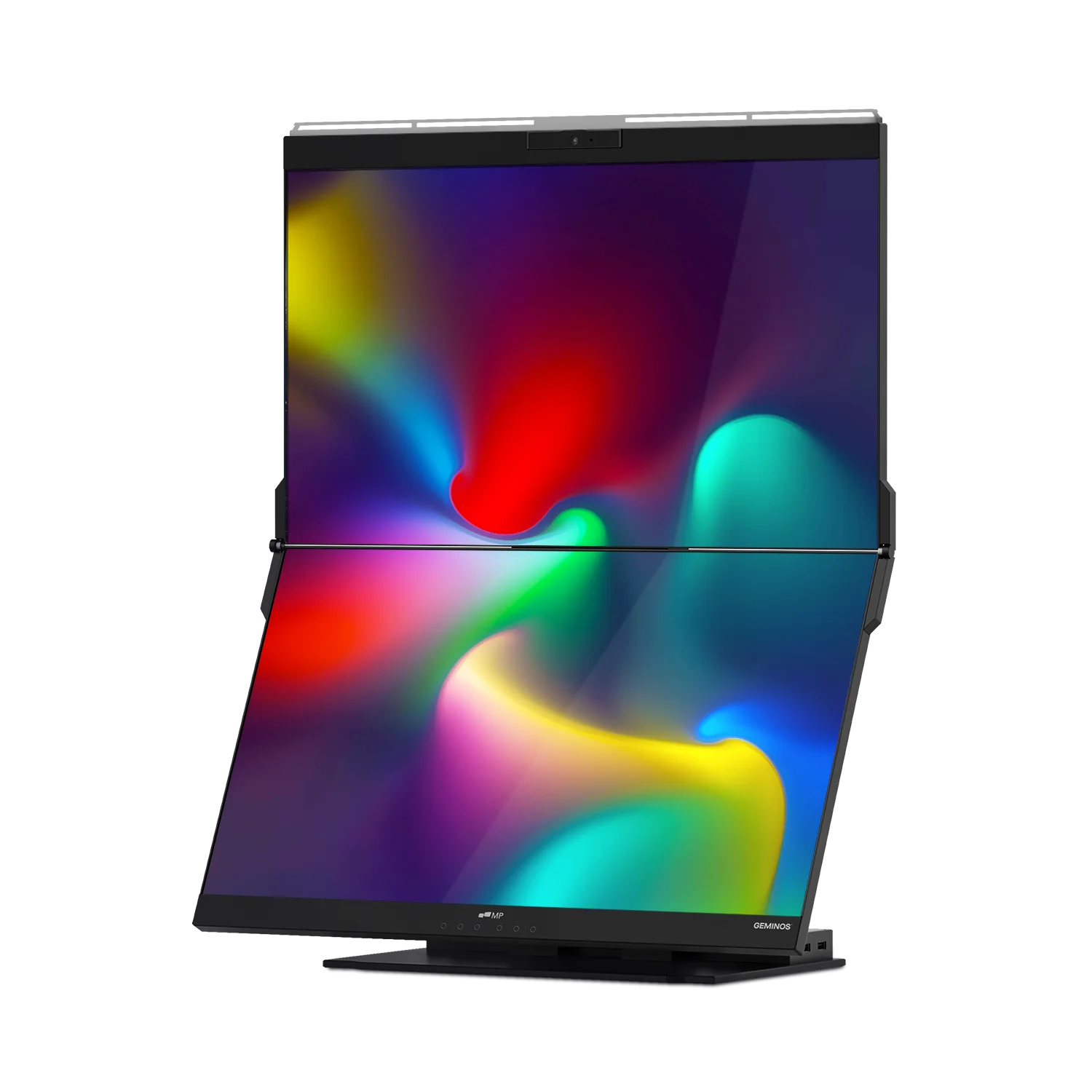
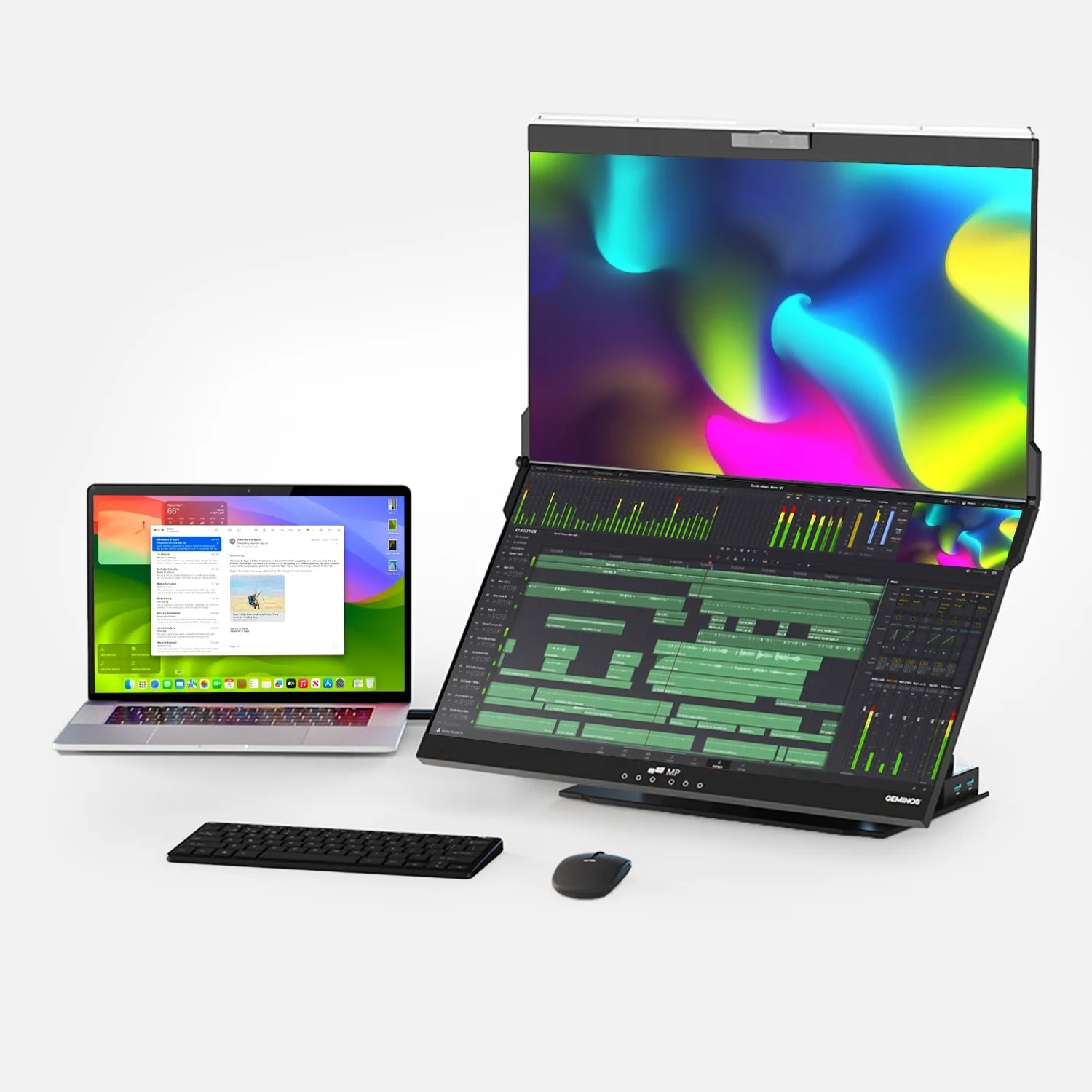
| Dual-panel laptop expander | Adds two screens at once; maximum portable screen real estate | Heavier than single-panel options; higher cost | Power users, developers, traders who travel |
What to Avoid When Buying a Portable Monitor
Alongside the criteria that define quality, there are several common pitfalls worth knowing before you buy:
- Monitors under 250 nits of brightness. These look acceptable in a dim room but become difficult to read near a window or in any bright environment. Budget monitors frequently understate this spec or measure it only at the maximum setting, which may reduce panel lifespan if held there permanently.
- Brands with no post-purchase support. Independent review aggregators consistently identify driver support and warranty response as major differentiators between reputable brands and budget manufacturers. Check for an accessible support channel before buying from an unfamiliar brand.
- TN panels marketed as "gaming portable monitors." While TN panels offer faster pixel response times, their narrow viewing angles and poor color accuracy make them actively worse for the mixed-use scenarios that portable monitors typically serve. An IPS panel with 120Hz handles gaming adequately while remaining much more versatile for productivity and media.
- Single USB-C port without video support. Some monitors list USB-C as a connectivity feature but only support USB-C for power, not video. If the listing does not explicitly state "DisplayPort Alt Mode" or "video via USB-C," it may require an HDMI cable separately for display output.
- Stands that are unstable or difficult to adjust. A portable monitor that wobbles, resists height adjustment, or cannot hold a consistent angle during typing is a practical frustration that specs will not warn you about. Prioritise reviews from users who specifically mention stand quality in the context of their actual use environment.
Frequently Asked Questions
Which portable monitor is the best overall in 2025?
The answer depends on your use case. For laptop-attached portability with the fastest setup and smallest footprint, the Mobile Pixels Duex Float 2 Pro is the top pick for remote workers and travelers. For premium display quality in a standalone form, the Espresso 15 Pro (4K, 550 nits, 15.6 inches) is highly rated by independent reviewers including Tom's Hardware. For budget-conscious users, 1080p IPS monitors in the $130 to $200 range from brands including ViewSonic, ASUS ZenScreen, and Lenovo offer solid everyday performance.
What screen size is best for a portable monitor?
15.6 inches is the most popular size and represents the best balance between screen space and portability for most users. Smaller 13.3-inch options fit into compact bags but offer limited workspace, while 17.3-inch monitors provide more real estate at the cost of weight and bag space. For laptop-attached designs, the monitor size is typically matched to the laptop — a 15-inch laptop pairs with a 15-inch attached panel. For standalone monitors, 15.6 to 16 inches is the practical sweet spot for daily carry.
Is 1080p good enough for a portable monitor in 2025?
Yes, for most productivity use cases. At 15.6 inches, a 1080p IPS display produces sharp text for documents, spreadsheets, email, and video calls. The resolution limitation becomes noticeable on screens larger than 17 inches or when working with dense design files that benefit from more pixel density. If your primary tasks are text-based and you prioritize portability and price, 1080p remains entirely appropriate and represents the most common portable monitor resolution in 2025.
Do I need a power outlet to use a portable monitor?
No, if you choose a model that powers via USB-C from your laptop. Most modern portable monitors draw power from the same USB-C connection that carries video, meaning your laptop battery powers the monitor. This eliminates the need for a wall outlet entirely. Some higher-brightness or larger models may need their own power input because the laptop USB-C cannot supply enough wattage. Check that the monitor is confirmed to operate from USB bus power alone if outlet-free use is important to you.
What is the difference between a portable monitor and a laptop screen extender?
The terms are used interchangeably but describe slightly different form factors. A "portable monitor" typically refers to a standalone display that sits beside your laptop supported by its own kickstand. A "laptop screen extender" or "laptop-attached monitor" mounts directly to the back of the laptop lid and slides out to extend the display to the side. The laptop-attached format requires no separate desk footprint and is more suitable for confined spaces. Both types connect via USB-C or HDMI and function as independent extended screens.
Are portable monitors worth buying for students?
Yes. Research from the University of Utah found that dual-screen users experience a 33% lower error rate on tasks requiring reference and data transfer — directly applicable to research writing, coding assignments, and studying with source material open alongside notes. Entry-level 1080p portable monitors start at around $100 to $130, making them one of the more accessible productivity upgrades available. Students who frequently move between library, dorm, and home can benefit significantly from the flexibility a portable second screen provides.
Can I use a portable monitor with a MacBook?
Yes, with the right connection method. Any MacBook with Thunderbolt 3 or 4 ports (all MacBook Pro and MacBook Air models from 2019 onward) can connect to a portable monitor via USB-C. MacBook Air M1 and M2 models support only one external display natively — but can drive two external screens using a DisplayLink USB adapter. MacBook Air M3 supports two external displays with the lid closed, and M4 supports two external displays freely. Most modern portable monitors with USB-C DisplayPort Alt Mode will work with MacBooks that support external displays.
How heavy is a typical portable monitor?
Most 15.6-inch portable monitors weigh between 650 grams and 950 grams (approximately 1.4 to 2.1 pounds). Premium aluminum-chassis models can approach 1.0 to 1.2 kg depending on size. Laptop-attached designs typically sit between 700 and 900 grams. For daily carry in a standard laptop bag, anything under 900 grams adds minimal burden. Models above 1.2 kg are better suited to regular hotel or desk use rather than constant daily commuting.
What is the fastest way to set up a portable monitor?
A laptop-attached monitor with magnetic mounting is the fastest option — typically under ten seconds from bag to operational display, with no stand assembly, height adjustment, or separate power connection required. For standalone portable monitors, the quickest setups use a magnetic protective cover that doubles as a kickstand — unfolded in one motion with no separate parts. Both Windows and macOS automatically detect the monitor and extend the desktop without requiring any settings change after the first setup, provided you have previously set the mode to "Extend."
Discover Tech Gadgets




Leave a comment
All comments are moderated before being published.
This site is protected by hCaptcha and the hCaptcha Privacy Policy and Terms of Service apply.